Confidential Global Enterprise Client
VSTO Outlook Add-in — Email Automation & CRM Integration
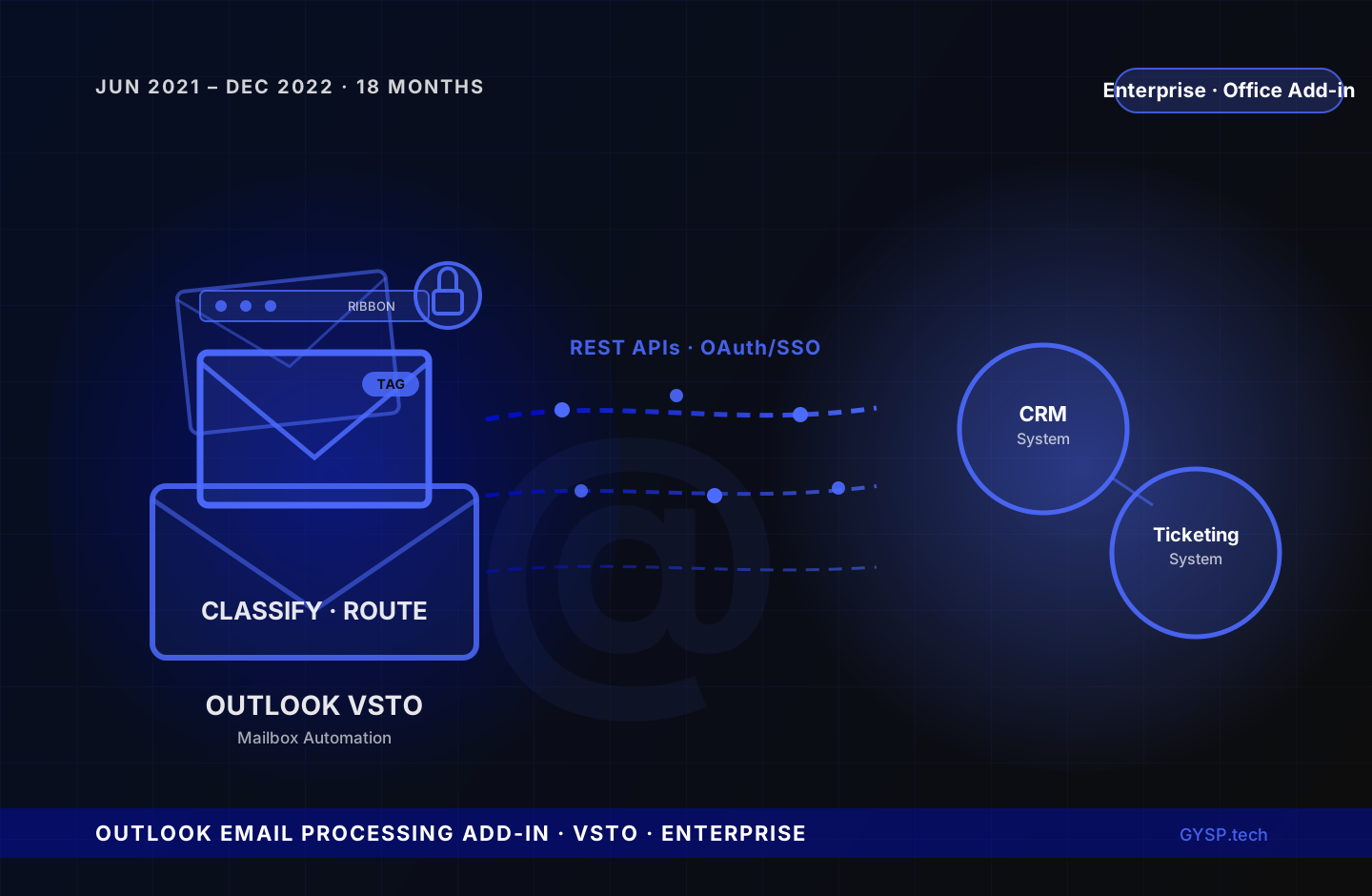
Inboxes were the bottleneck, with every incoming email requiring manual triage, attachment handling, and ticket creation before any real work began. GYSP built an Outlook VSTO Add-in that classified, routed, and processed emails automatically, secured with OAuth and enterprise SSO.
Industry
Enterprise Technology
Key Result
Near-Zero Manual Email Triage for Automated Categories
Primary Service
Custom Software Development
Core Stack
VSTO, .NET, C#
The Challenge
High-volume inboxes were absorbing hours of manual effort that had nothing to do with the actual work the emails represented: classifying incoming messages by type, extracting attachments by hand, re-keying metadata, and manually creating or updating records in the firm's CRM and ticketing systems before any substantive processing could begin. Every one of those steps was a place for delay and transcription error, and response times suffered as a direct result. Security compounded the problem. The add-in needed to authenticate against internal CRM and ticketing systems without asking users to manage a separate set of credentials, which meant building enterprise-grade authentication directly into the Outlook integration itself rather than treating it as a backend-only concern. Because the tool sat directly inside the daily workflow of every user who touched email, bugs and performance issues couldn't sit in a backlog. Production support had to be fast and continuous. And as the engagement scaled, new developers joining the team needed to get productive on an unfamiliar architecture quickly, without slowing delivery.
Our Solution
GYSP built a native Outlook VSTO Add-in that automated email classification and document processing directly inside the mailbox. Custom Ribbon menus and context actions were added to Outlook's interface so users could trigger classification, routing, or processing actions without ever leaving their inbox. The add-in integrated with the firm's internal CRM and ticketing systems via REST APIs and Web Services, automatically creating and updating records as emails were processed instead of requiring manual re-entry. Attachment extraction, metadata tagging, and automated email routing reduced manual triage to near-zero for the highest-volume email categories. COM Interop and the Outlook Object Model were used extensively for direct, programmatic mailbox operations: reading, moving, tagging, and acting on emails at a level the built-in Outlook UI couldn't reach. Secure authentication was implemented using OAuth combined with enterprise SSO integration, bringing the add-in under the same identity and access controls as the rest of the enterprise stack rather than maintaining a separate credential flow. Beyond the initial build, GYSP owned ongoing production support, bug fixing and performance tuning to keep the add-in responsive under real mailbox load, and mentored junior developers joining the team on VSTO architecture and Office Add-in best practices as the engagement scaled.
Delivery friction compounds fast. Quantify yours in 5 min.
Key Deliverables
- Native Outlook VSTO Add-in built for automated email classification and document processing directly inside the mailbox
- Custom Ribbon menus and context actions added to Outlook's interface, letting users trigger automation without leaving their inbox
- Integration with internal CRM and ticketing systems via REST APIs and Web Services, automatic record creation and updates eliminating manual re-entry
- Attachment extraction, metadata tagging, and automated email routing reducing manual triage to near-zero for high-volume email categories
- Secure OAuth and enterprise SSO integration, bringing the add-in under the same identity and access controls as the rest of the enterprise stack
- Extensive use of COM Interop and the Outlook Object Model for direct, programmatic mailbox operations
- Ongoing production support, performance tuning, and mentorship of junior developers on VSTO architecture as the team scaled
Services Delivered
- Custom Software Development
- Office Add-in Development
- Systems Integration
- Identity & Access Management
Tech Stack
This engagement used VSTO, .NET, C#, COM Interop, Outlook Object Model, and 3 additional tools.
Frequently Asked Questions
What is a VSTO Outlook Add-in and why build one instead of a separate application?+
VSTO (Visual Studio Tools for Office) is Microsoft's framework for building managed-code add-ins that run natively inside Office applications. GYSP built the email classification and processing automation directly into Outlook using VSTO so users could trigger it from custom Ribbon menus and context actions without ever leaving their inbox. A standalone application would have required users to switch context for every email, undermining adoption.
How did the add-in integrate with CRM and ticketing systems?+
The add-in connected to the firm's internal CRM and ticketing systems via REST APIs and Web Services, automatically creating and updating records as emails were classified and processed. This eliminated the manual re-entry step that previously required someone to read an email, extract the relevant details, and key them into a separate system by hand.
How was security handled for an Outlook add-in with OAuth and SSO?+
GYSP implemented OAuth combined with enterprise SSO integration directly inside the add-in, so it authenticated against internal systems using the same identity and access controls as the rest of the enterprise stack. This avoided a separate credential flow for the add-in, a common security gap in Office integrations, and meant access could be managed centrally through existing enterprise identity policies.
What ongoing support did GYSP provide after the initial build?+
GYSP owned production support, bug fixing, and performance tuning for the add-in throughout an 18-month engagement, keeping it responsive under real mailbox load as usage scaled. GYSP also mentored junior developers joining the team on VSTO architecture and Office Add-in best practices, ensuring the team could extend and maintain the add-in independently as it grew.
Work with GYSP
Similar Enterprise Technology challenge?
Get a free technical brief: architecture options, cost estimates, and a delivery timeline scoped to your challenge.
- 48-hour turnaround
- Senior engineers only
- No commitment required
Or call: +1 (929) 588-8364
More Enterprise Technology Case Studies
 Enterprise Technology
Enterprise Telecom Giant
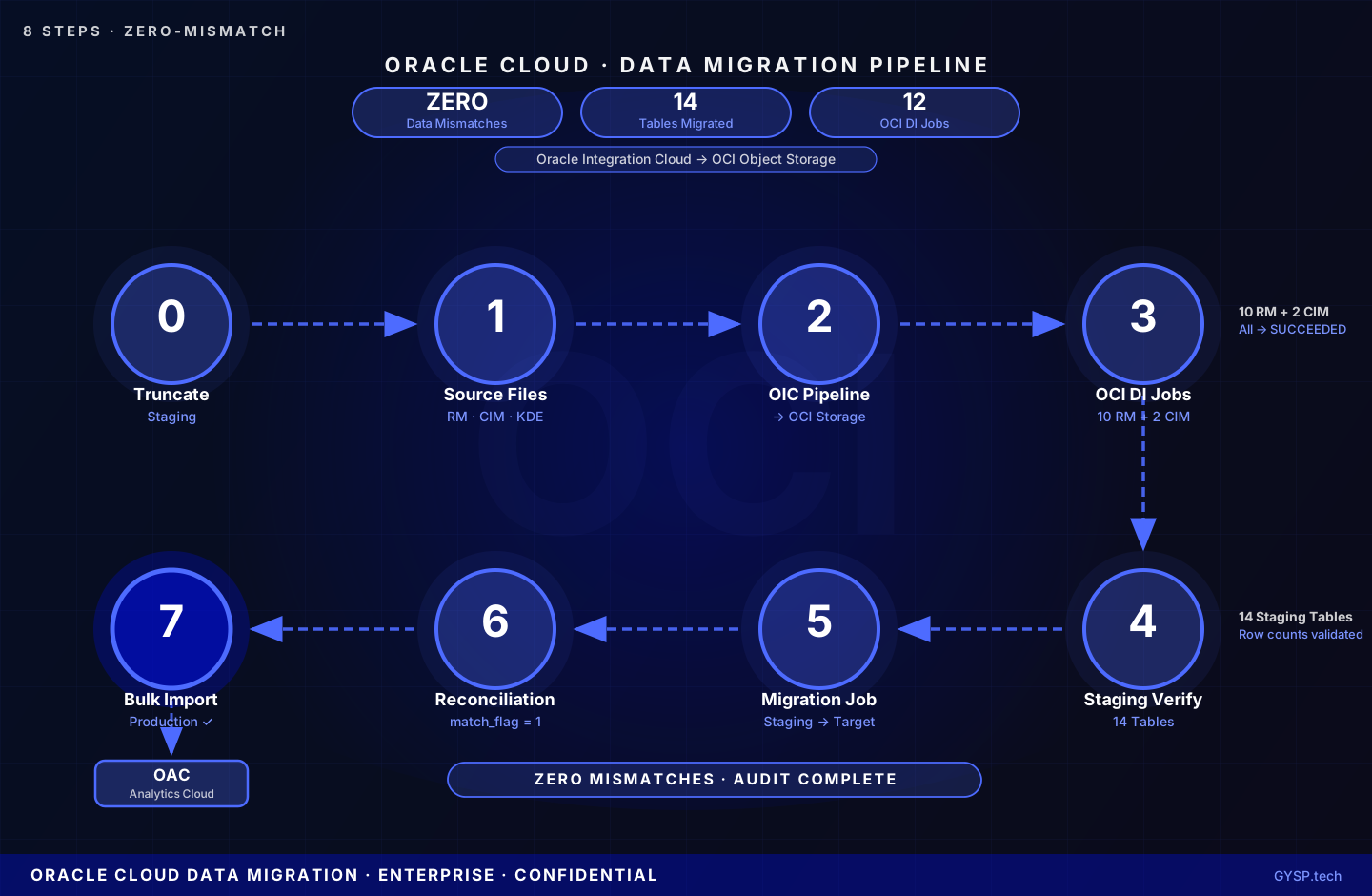
A confidential enterprise client engaged GYSP as a dedicated Oracle resource to architect and execute an 8-phase Oracle Cloud data migration, moving Revenue Management and Customer Information Management data through a validated pipeline, achieving zero data mismatches across 14 staging tables.
 Enterprise Technology
Global Professional Services Firm
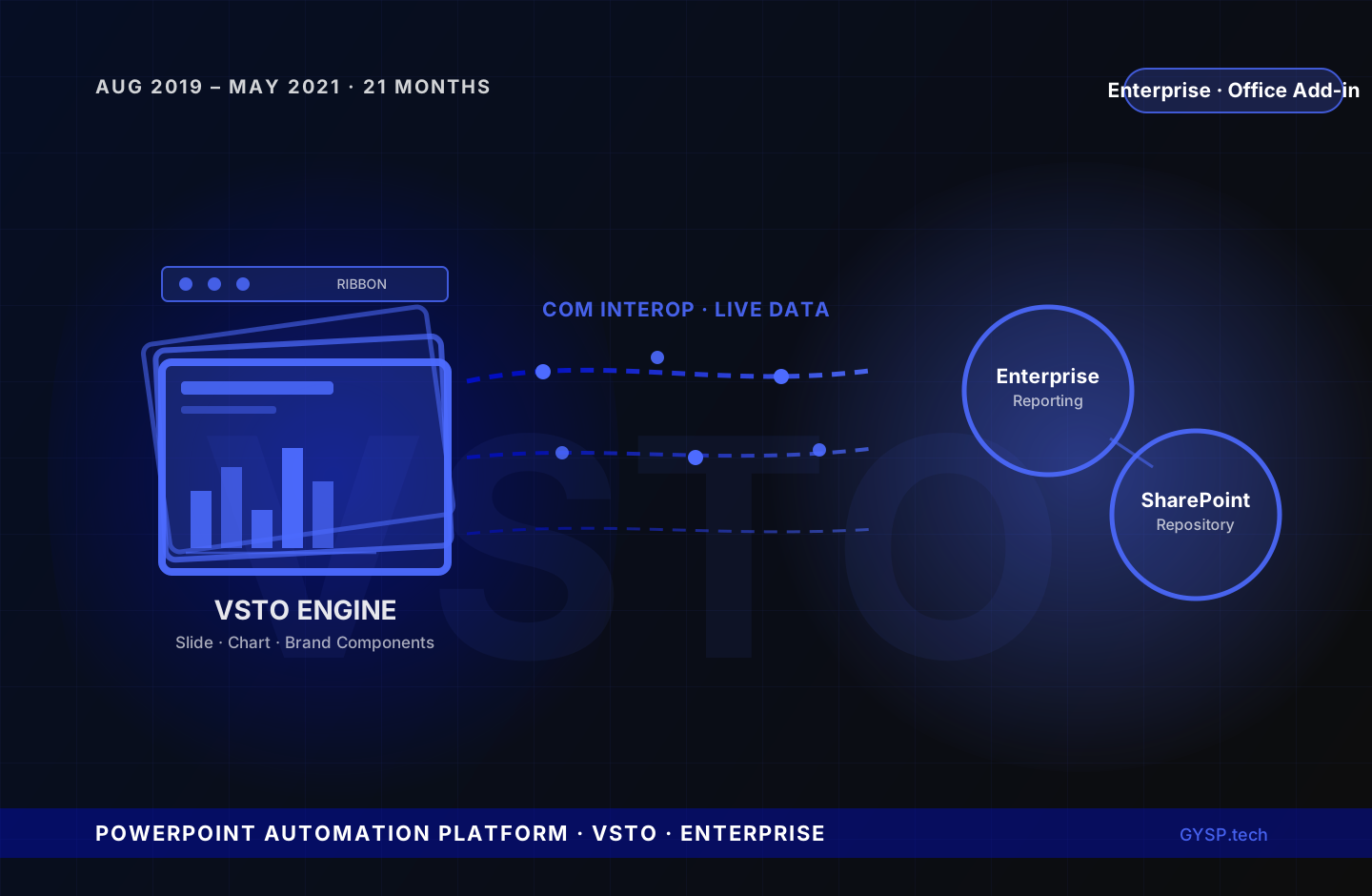
Business teams were losing hours per proposal manually rebuilding slides, charts, and formatting from scratch. GYSP built a native PowerPoint automation platform that generated branded, data-accurate decks directly inside the tool teams already used every day.
 Enterprise Technology
Global Enterprise — VDI Expansion Programme
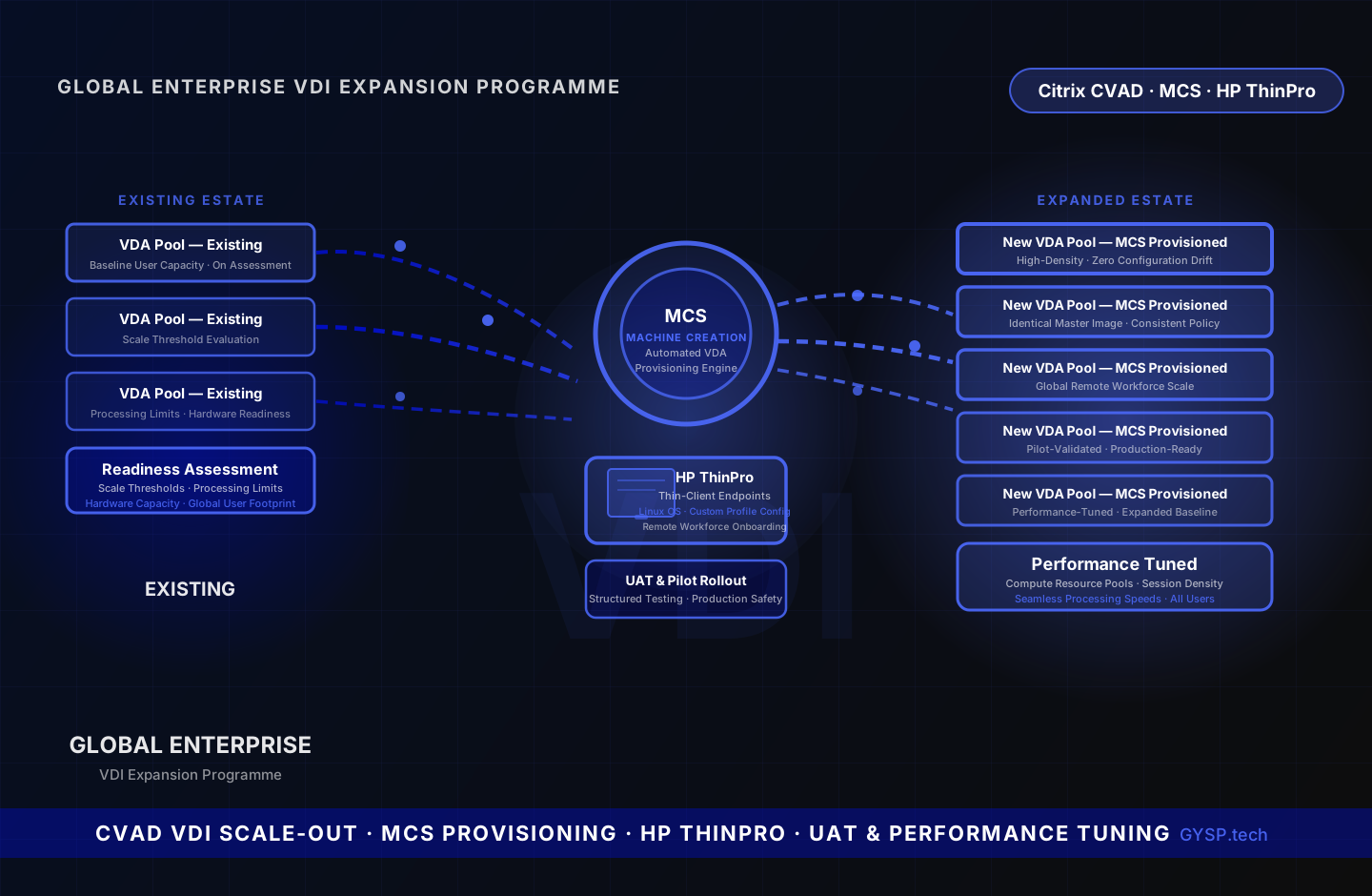
A global enterprise needed to scale its Citrix VDI estate to support a growing remote workforce without disrupting existing operations. GYSP assessed infrastructure readiness, provisioned new Virtual Delivery Agents using Machine Creation Services automation, configured HP ThinPro thin-client endpoints for incoming remote users, managed structured UAT and pilot rollout, and tuned compute resource pools to sustain performance across the expanded user baseline.
