Global Professional Services Firm
PowerPoint Automation Platform — VSTO Enterprise Add-in
Business teams were losing hours per proposal manually rebuilding slides, charts, and formatting from scratch. GYSP built a native PowerPoint automation platform that generated branded, data-accurate decks directly inside the tool teams already used every day.
Industry
Enterprise Technology
Key Result
Zero Manual Copy-Paste Between Reporting Systems and Decks
Primary Service
Custom Software Development
Core Stack
VSTO, .NET, C#
The Challenge
Proposal and reporting decks were consuming hours of business team time on work that had nothing to do with the substance of the proposal itself: rebuilding slide layouts, manually copying charts and figures out of enterprise reporting systems and SharePoint repositories, and reformatting every deck to match brand guidelines that drifted slightly with every team that touched them. The inconsistency wasn't just cosmetic: with no shared automation layer, every business team was independently solving the same slide-creation and chart-rendering problems, and brand consistency depended entirely on individual diligence rather than the platform itself. Any fix had to work inside PowerPoint, not as a separate web tool. These teams lived in Office every day, and a solution that asked them to learn a new application would fail on adoption alone. The engagement also had to operate inside a continuous Agile delivery model, with enhancements and fixes landing every sprint against strict timelines, rather than as a single up-front build.
Our Solution
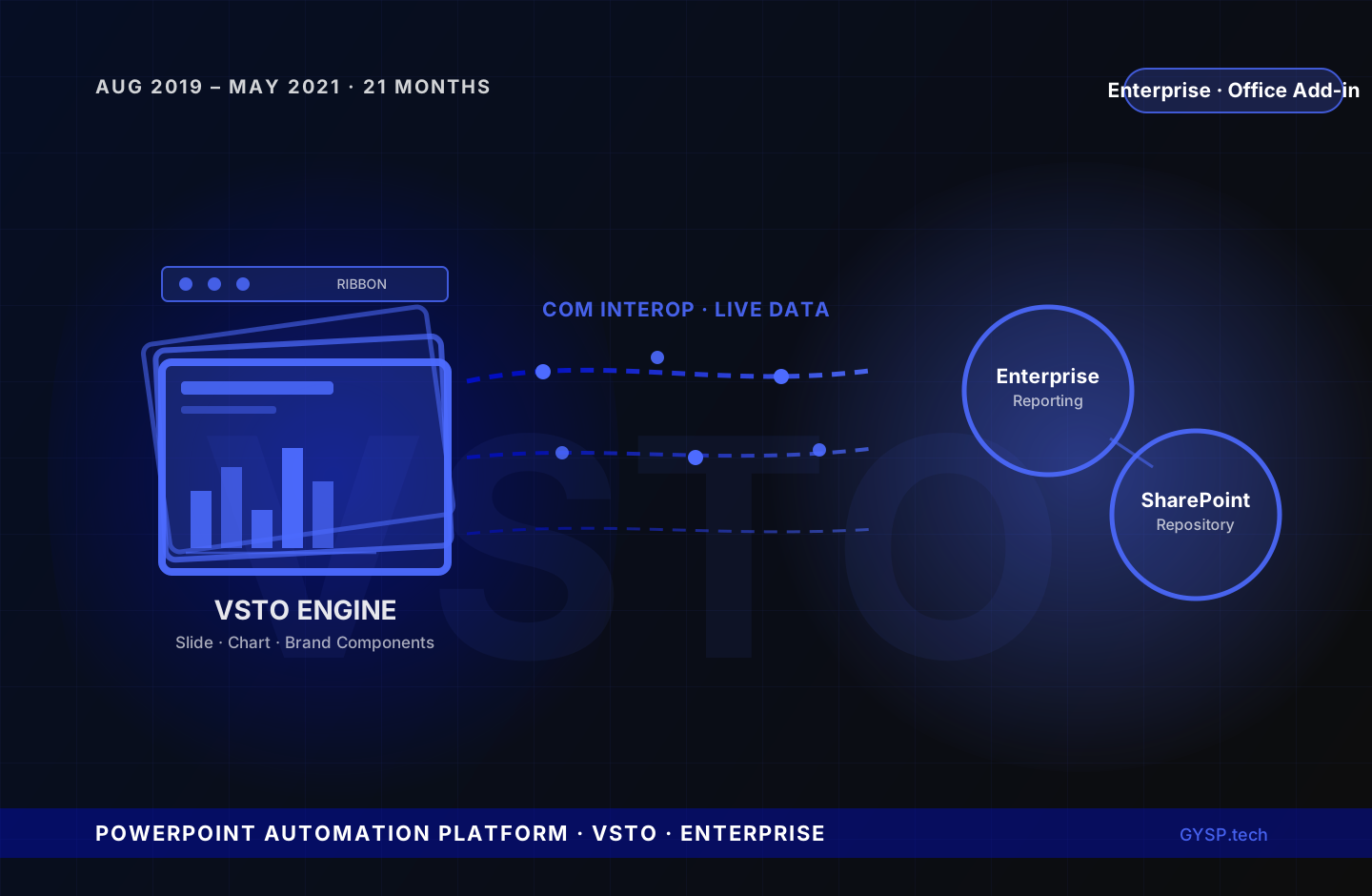
GYSP built a VSTO (Visual Studio Tools for Office) based PowerPoint automation platform embedded natively inside the application business teams already used. Reusable components handled slide creation, chart rendering, and branding consistency centrally, so every deck generated through the platform inherited the same visual standard regardless of which team produced it. The platform integrated directly with the firm's enterprise reporting systems and SharePoint repositories, pulling source data straight into decks and eliminating the manual copy-paste step that had been the single biggest source of both wasted time and transcription errors. Dynamic chart and image generation was implemented using Office Object Models and COM Interop, rendering live data visualisations at generation time rather than relying on static, manually-updated images. Custom task panes and Ribbon controls were built directly into PowerPoint's native interface, giving business users one-click access to automation without ever leaving the application or learning new software. GYSP worked closely with the business teams producing proposals and reports to map their actual workflows into the automation, then delivered enhancements and fixes continuously within Agile sprint cycles, with peer code review and unit testing maintaining quality across nearly two years of ongoing delivery.
Delivery friction compounds fast. Quantify yours in 5 min.
Key Deliverables
- VSTO-based PowerPoint automation platform built for proposal and reporting deck generation at enterprise scale
- Reusable components engineered for slide creation, dynamic chart rendering, and branding consistency across every output
- Direct integration with enterprise reporting systems and SharePoint repositories, eliminating manual copy-paste from source data into decks
- Custom task panes and Ribbon controls embedded natively inside PowerPoint, giving business teams one-click automation without leaving their familiar tool
- Dynamic chart and image generation implemented via Office Object Models and COM Interop
- Close collaboration with business teams to map proposal and reporting workflows directly into the automation
- Continuous delivery within Agile sprint cycles, with peer code review and unit testing sustaining quality across 21 months
Services Delivered
- Custom Software Development
- Office Add-in Development
- Enterprise Automation
- SharePoint Integration
Tech Stack
This engagement used VSTO, .NET, C#, COM Interop, Office Object Model, and 3 additional tools.
Frequently Asked Questions
What is VSTO and why was it used to build PowerPoint automation?+
VSTO (Visual Studio Tools for Office) is Microsoft's framework for building managed-code add-ins that run natively inside Office applications. GYSP used it to embed the automation platform directly inside PowerPoint, rather than building a separate web application, ensuring business teams could access slide, chart, and branding automation without leaving the tool they already used every day, which was critical for adoption.
How did the platform integrate with enterprise reporting systems and SharePoint?+
The platform connected directly to the firm's enterprise reporting systems and SharePoint repositories, pulling source data straight into generated decks. This eliminated the manual copy-paste step that previously consumed significant business team time and was the leading source of transcription errors between source reports and final proposal or reporting decks.
What are custom task panes and Ribbon controls, and why do they matter for user adoption?+
Task panes and Ribbon controls are native PowerPoint UI extensions. A task pane is a dockable panel inside the application, and Ribbon controls add custom buttons to PowerPoint's existing toolbar. GYSP built both so business users could trigger automation with a single click inside PowerPoint's familiar interface, removing the adoption barrier that a separate standalone tool would have introduced.
How was brand consistency enforced across decks generated by different business teams?+
Slide creation, chart rendering, and formatting were centralised into reusable components within the automation platform itself, rather than left to each business team's individual diligence. Every deck generated through the platform inherited the same visual standard automatically, removing the brand drift that occurs when formatting depends on manual adherence to guidelines rather than being enforced by the tooling.
Work with GYSP
Similar Enterprise Technology challenge?
Get a free technical brief: architecture options, cost estimates, and a delivery timeline scoped to your challenge.
- 48-hour turnaround
- Senior engineers only
- No commitment required
Or call: +1 (929) 588-8364
More Enterprise Technology Case Studies
 Enterprise Technology
Enterprise Telecom Giant
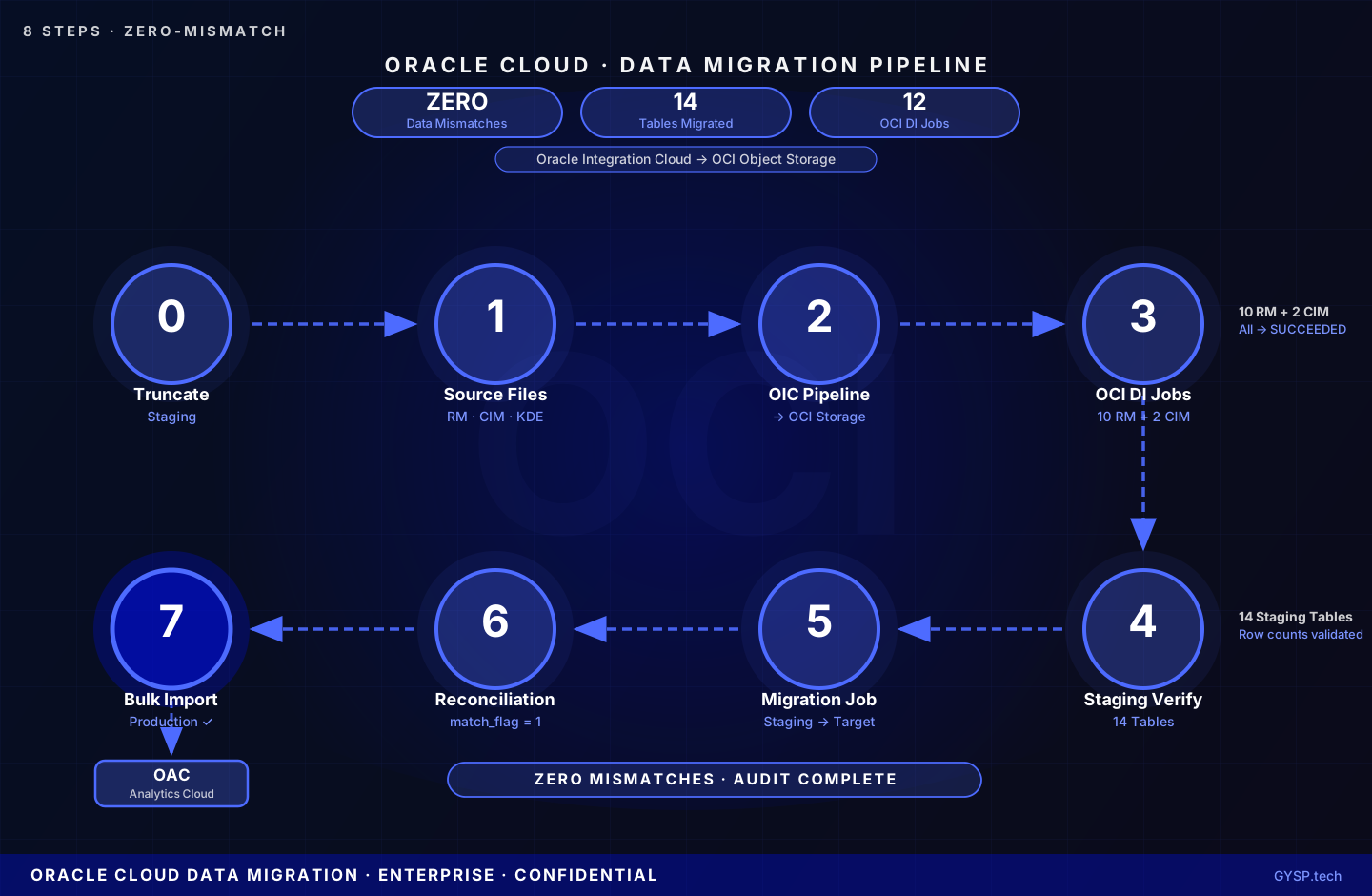
A confidential enterprise client engaged GYSP as a dedicated Oracle resource to architect and execute an 8-phase Oracle Cloud data migration, moving Revenue Management and Customer Information Management data through a validated pipeline, achieving zero data mismatches across 14 staging tables.
 Enterprise Technology
Confidential Global Enterprise Client
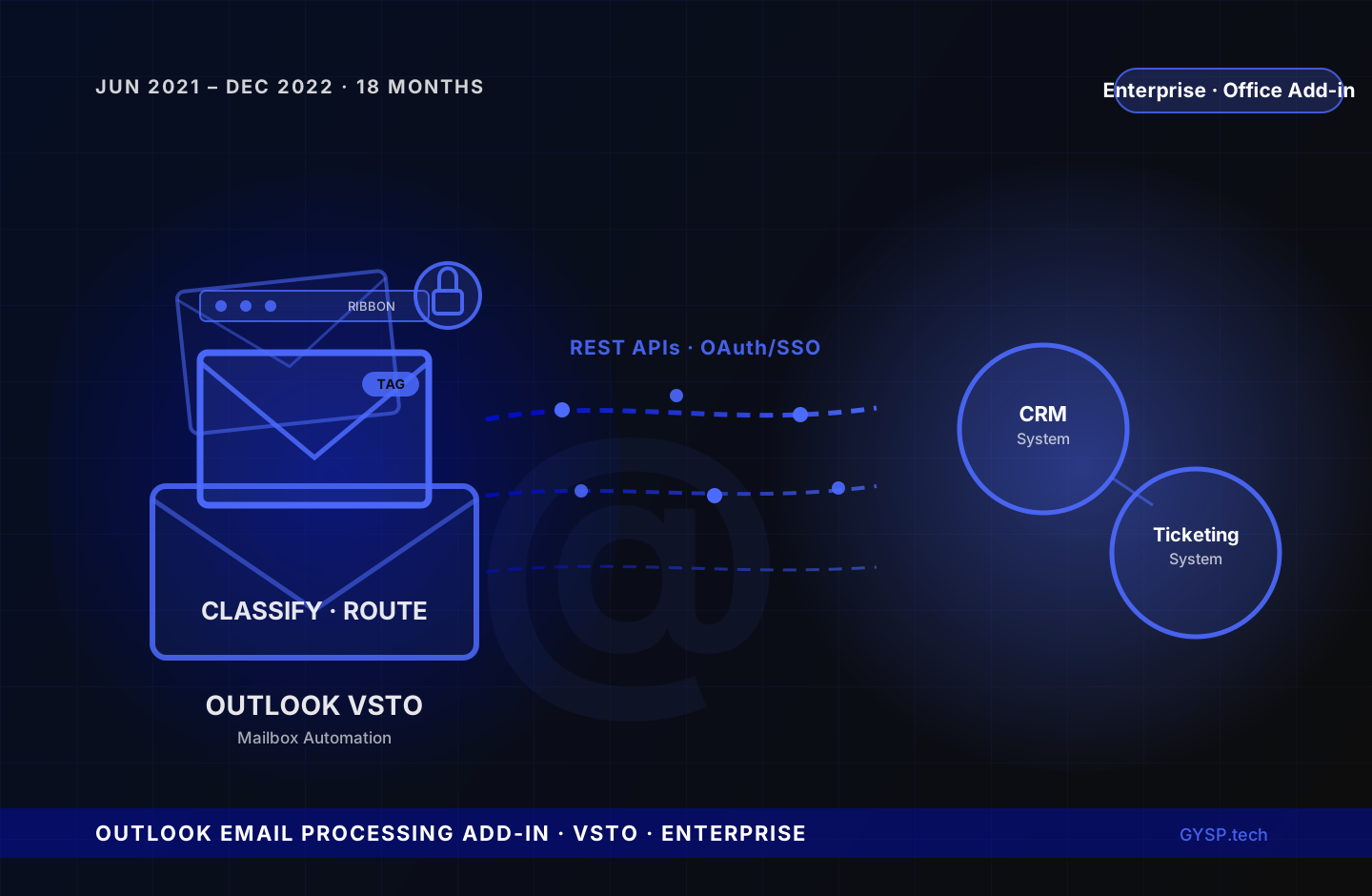
Inboxes were the bottleneck, with every incoming email requiring manual triage, attachment handling, and ticket creation before any real work began. GYSP built an Outlook VSTO Add-in that classified, routed, and processed emails automatically, secured with OAuth and enterprise SSO.
 Enterprise Technology
Global Enterprise — VDI Expansion Programme
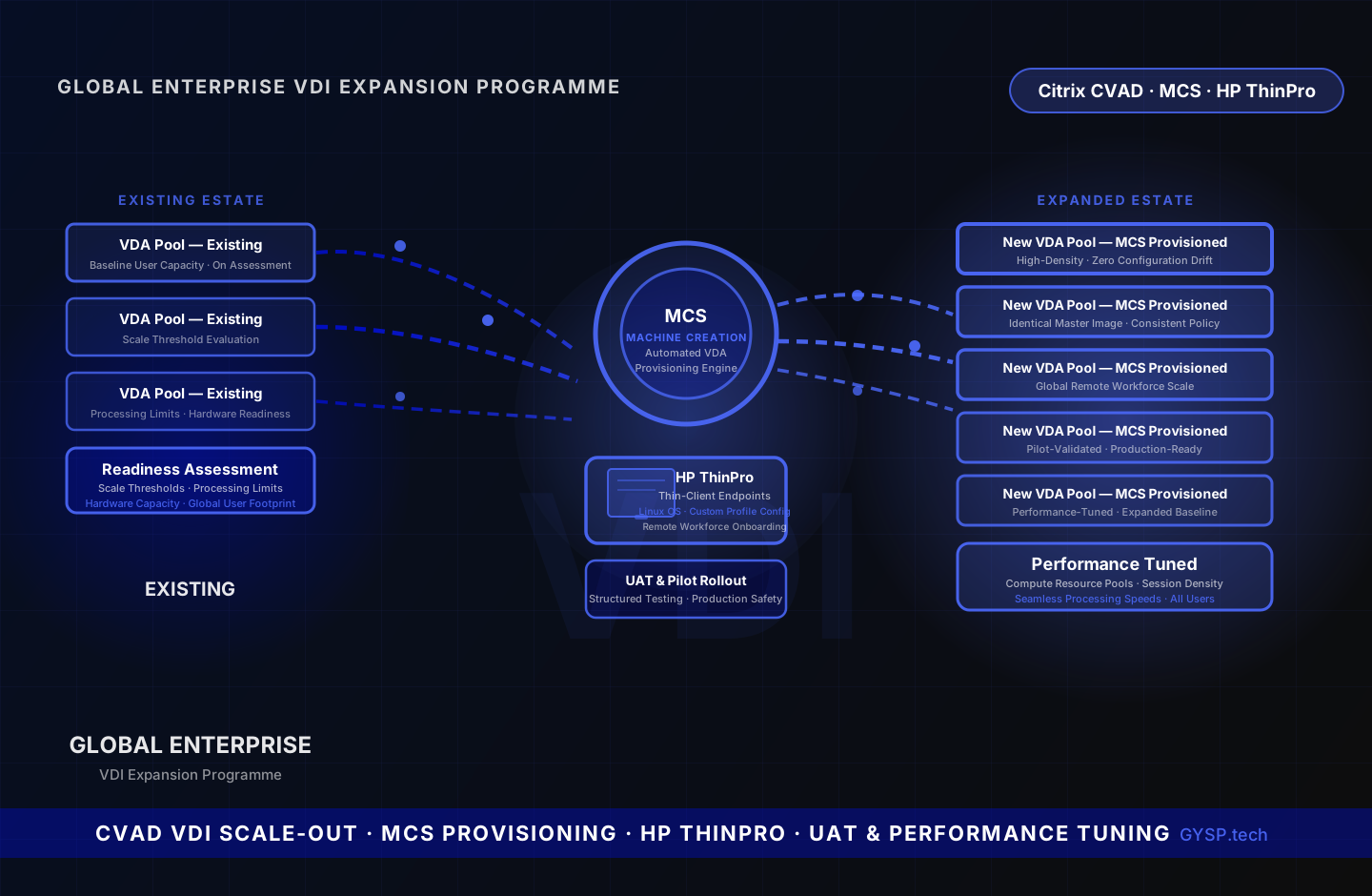
A global enterprise needed to scale its Citrix VDI estate to support a growing remote workforce without disrupting existing operations. GYSP assessed infrastructure readiness, provisioned new Virtual Delivery Agents using Machine Creation Services automation, configured HP ThinPro thin-client endpoints for incoming remote users, managed structured UAT and pilot rollout, and tuned compute resource pools to sustain performance across the expanded user baseline.
