Global Enterprise — VDI Expansion Programme
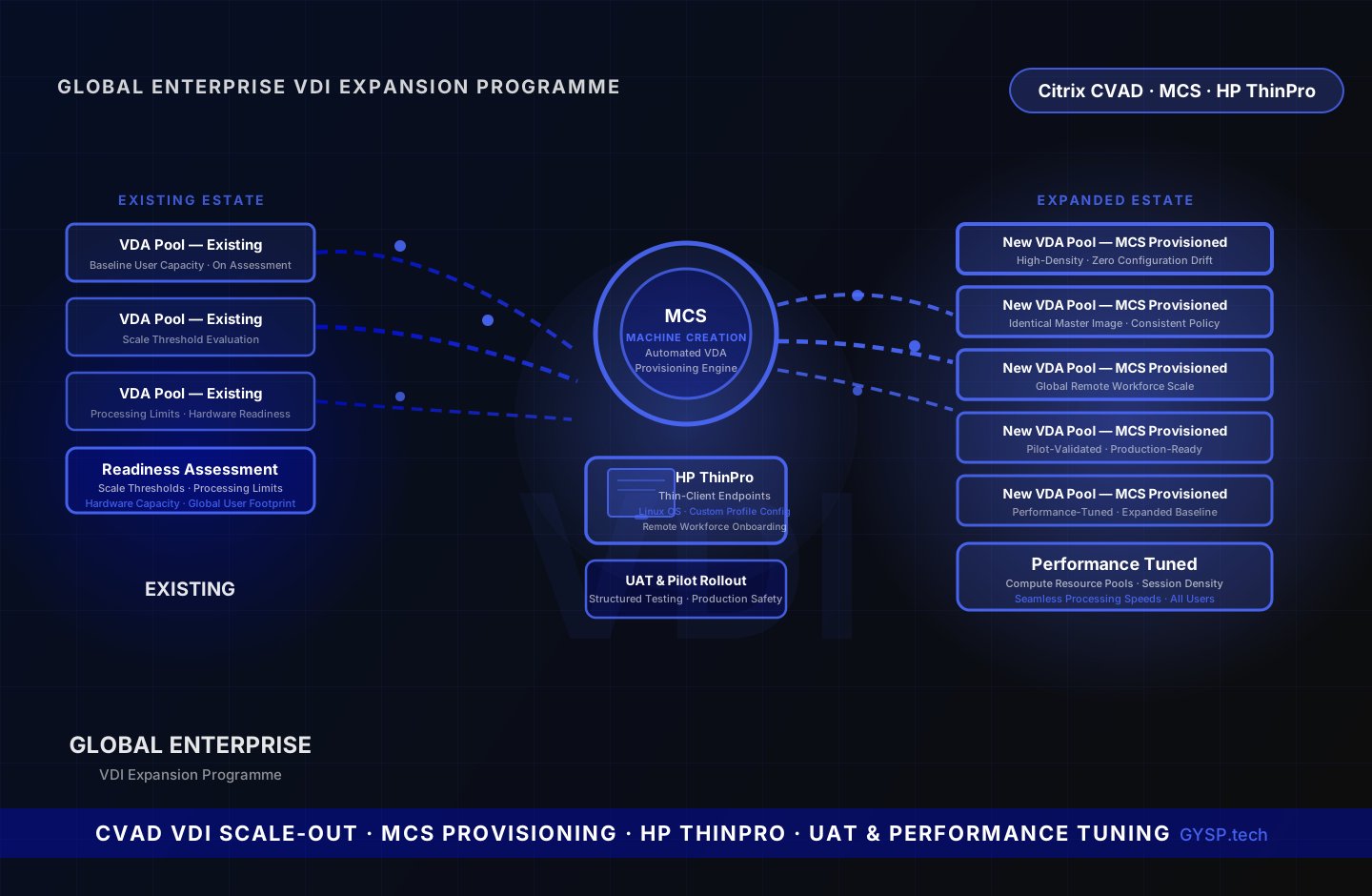
A global enterprise needed to scale its Citrix VDI estate to support a growing remote workforce without disrupting existing operations. GYSP assessed infrastructure readiness, provisioned new Virtual Delivery Agents using Machine Creation Services automation, configured HP ThinPro thin-client endpoints for incoming remote users, managed structured UAT and pilot rollout, and tuned compute resource pools to sustain performance across the expanded user baseline.
The Challenge
Scaling a Citrix VDI estate to accommodate a growing global remote workforce is not a simple provisioning exercise. Expanding too aggressively risks performance degradation for existing users; under-provisioning leaves incoming users with unacceptable session quality. A rigorous infrastructure readiness assessment was needed to determine exactly where scale thresholds, processing limits, and hardware capacity would be reached under projected user load — before a single new VDA was deployed. HP ThinPro thin-client terminals presented an additional configuration layer: unlike standard Windows endpoints, ThinPro devices run HP's Linux-based OS and require purpose-built local environment programming to connect reliably to Citrix, enforce session policies, and support the peripheral and display requirements of remote workers. A structured pilot approach was required to validate the full stack — MCS-provisioned VDAs to ThinPro endpoint configurations — before opening access to the full incoming user population.
Our Solution
Conducted a comprehensive infrastructure readiness assessment: evaluated scale thresholds, processing limits, and hardware capacity against projected user footprint, producing a clear provisioning plan. Provisioned new Virtual Delivery Agents using Machine Creation Services, leveraging MCS automation for high-density, consistent VDA deployment without configuration drift. Configured and deployed HP ThinPro thin-client endpoints: programmed local environment settings, optimised Citrix Workspace configurations, and validated peripheral and display policy enforcement for remote user onboarding. Facilitated structured UAT cycles and managed pilot rollout tracks to validate the expanded environment under real-world usage before full production deployment. Conducted intensive post-deployment VDI performance tuning across compute resource pools to maintain consistent session quality across the expanded user baseline.
Facing a similar challenge? Get a no-commitment technical brief.
Get free briefKey Deliverables
- Assessed infrastructure expansion readiness: evaluated scale thresholds, processing limits, and hardware capacity against projected global remote user footprint before any provisioning
- Provisioned new Virtual Delivery Agents using Machine Creation Services (MCS) automation — high-density, consistent VDA deployment eliminating configuration drift at scale
- Configured and deployed HP ThinPro thin-client terminal endpoints: programmed local environment settings and Citrix Workspace configurations for remote workforce onboarding
- Facilitated structured UAT cycles and managed pilot rollout tracks to validate expanded VDI environment under real-world usage before full production go-live
- Executed intensive post-deployment VDI performance tuning across compute resource pools, maintaining consistent session quality across the expanded global user baseline
Services Delivered
- VDI Infrastructure Assessment
- MCS VDA Provisioning
- HP ThinPro Endpoint Configuration
- UAT & Pilot Management
Tech Stack
Frequently Asked Questions
What is Machine Creation Services (MCS) and why use it for VDA provisioning at scale?+
MCS is Citrix's built-in automated provisioning mechanism — it creates and manages pools of Virtual Delivery Agents from a single master image using storage snapshot technology. Rather than manually provisioning and configuring each VDA, MCS clones the master image to produce any number of VDAs consistently and quickly. Every VDA is identical, configuration drift is eliminated, and scaling becomes a matter of extending the MCS catalog rather than individually deploying and joining machines. For an expansion programme adding significant user capacity across a global estate, MCS automation is the only approach that scales without proportional manual overhead.
What is HP ThinPro and what makes it different to configure compared to standard Windows endpoints?+
HP ThinPro is HP's Linux-based operating system for thin-client hardware — devices purpose-built to run remote desktop and virtualisation sessions rather than local applications. Unlike a Windows PC where Citrix Workspace is installed and configured through Group Policy, ThinPro requires configuration through HP-specific administration tools (HP Device Manager or direct profile management). Local environment settings — Citrix connection broker addresses, display resolution policies, peripheral redirection, USB mapping, smart card pass-through — are programmed as ThinPro profiles. Getting these right across a diverse remote workforce requires both ThinPro OS expertise and Citrix session policy knowledge to ensure every device type and peripheral combination works correctly at first logon.
Why is a structured UAT and pilot programme important for a VDI expansion rather than a direct rollout?+
A VDI expansion deploys new capacity alongside existing production infrastructure — new VDAs running from the same Delivery Controllers, network paths, and application publishing configuration as current users. Without a controlled pilot, any misconfiguration in the new VDA catalog — MCS settings, session policies, application entitlements — or ThinPro endpoint profile could affect all incoming users simultaneously at go-live. A structured pilot selects representative users from each department and role type, validates all applications on new VDAs, tests ThinPro behaviour across the device model range, and confirms performance before opening access to the full incoming user population.
What does post-deployment VDI performance tuning involve at expanded scale?+
After VDA provisioning and user onboarding, compute resource pools require active tuning to sustain consistent session quality at high density. This includes: adjusting vCPU and RAM allocations per VDA based on observed real-world usage patterns; optimising Autoscale thresholds and buffer settings for appropriate host pool sizing; tuning Windows session host settings such as display compression, multimedia redirection, and audio quality policies; reviewing hypervisor-layer configuration for memory overcommit and CPU scheduling; and establishing performance baselines that detect degradation early as the user population grows further. Post-deployment tuning is what separates a VDI environment that performs at go-live from one that sustains performance at full production load.
Work with GYSP
Want results like these?
Get a free technical brief — architecture options, cost estimates, and a delivery timeline tailored to your challenge.
- 48-hour turnaround
- Senior engineers only
- No commitment required
Or call: +1 (929) 588-8364
Services Used
More Enterprise Technology Case Studies
 Enterprise Technology
Confidential Enterprise Client
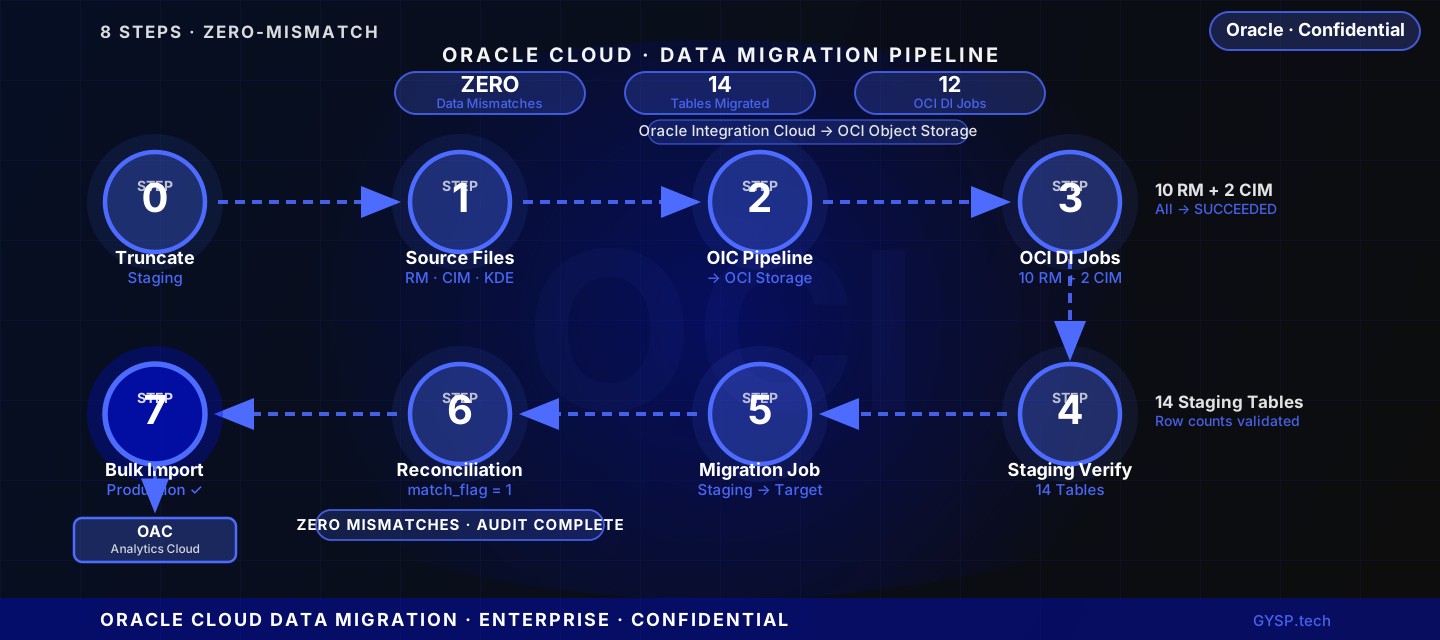
A confidential enterprise client engaged GYSP as a dedicated Oracle resource to architect and execute an 8-phase Oracle Cloud data migration — moving Revenue Management and Customer Information Management data through a validated pipeline, achieving zero data mismatches across 14 staging tables.
 Enterprise Technology
Global Professional Services Firm
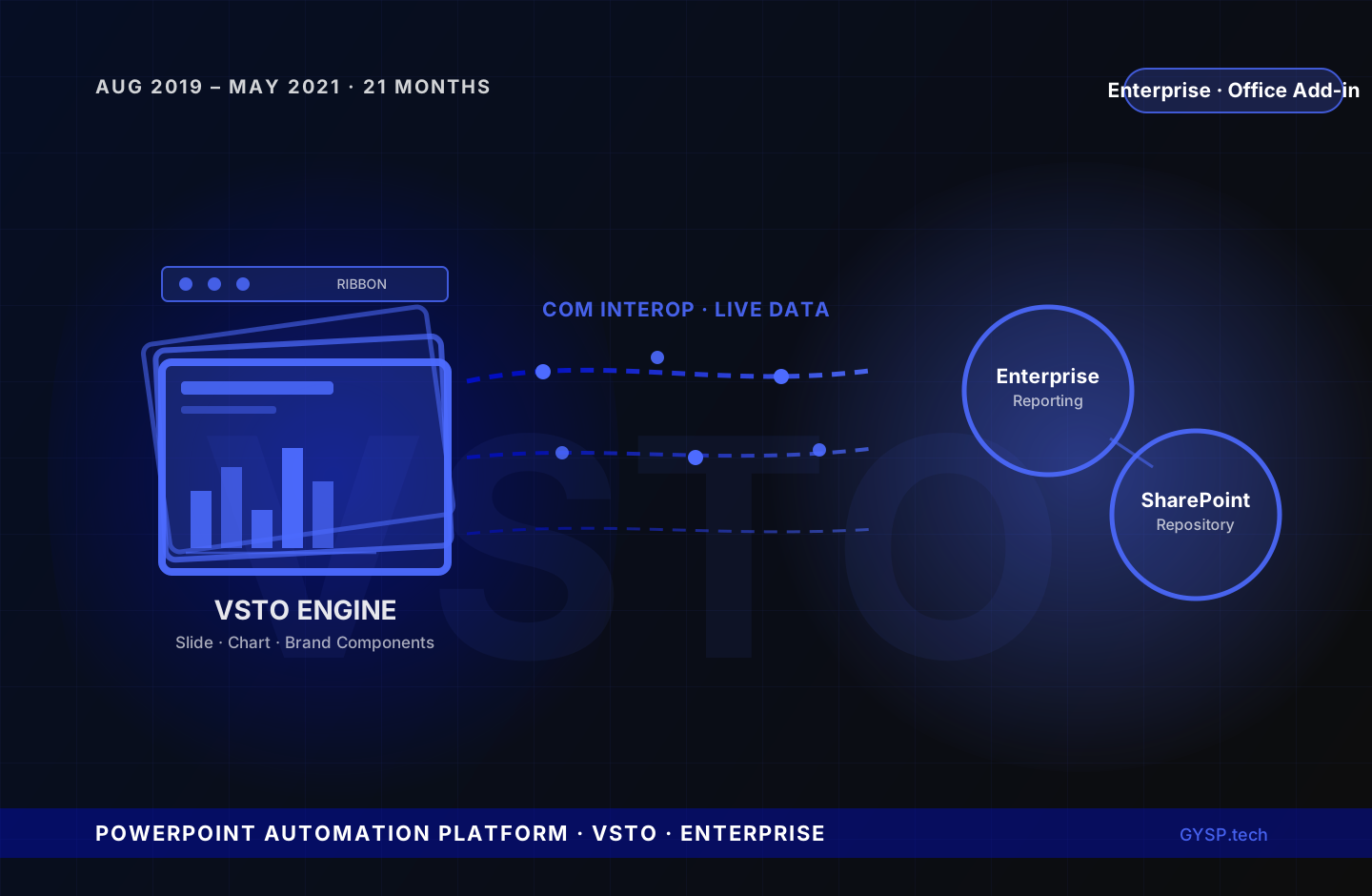
Business teams were losing hours per proposal manually rebuilding slides, charts, and formatting from scratch. GYSP built a native PowerPoint automation platform that generated branded, data-accurate decks directly inside the tool teams already used every day.
 Enterprise Technology
Confidential Global Enterprise Client
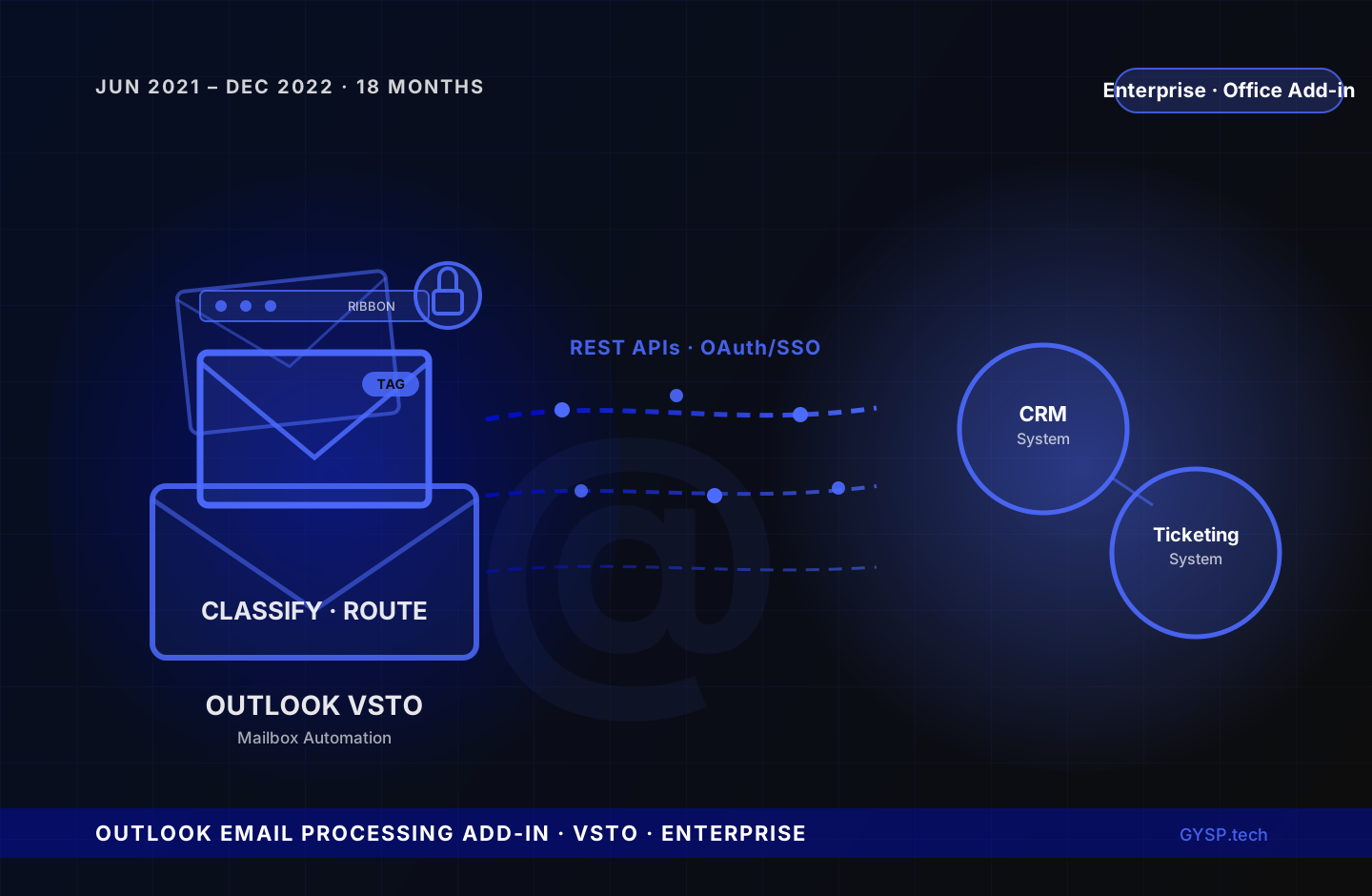
Inboxes were the bottleneck — every incoming email requiring manual triage, attachment handling, and ticket creation before any real work began. GYSP built an Outlook VSTO Add-in that classified, routed, and processed emails automatically, secured with OAuth and enterprise SSO.
